Does Starlink Need to Be on the Roof? Your Actual Options, Explained ## Does Starlink Really Need to Be Mounted on Your Roof?
Quick Answer
Question: Does a Starlink dish have to go on the roof to work properly?
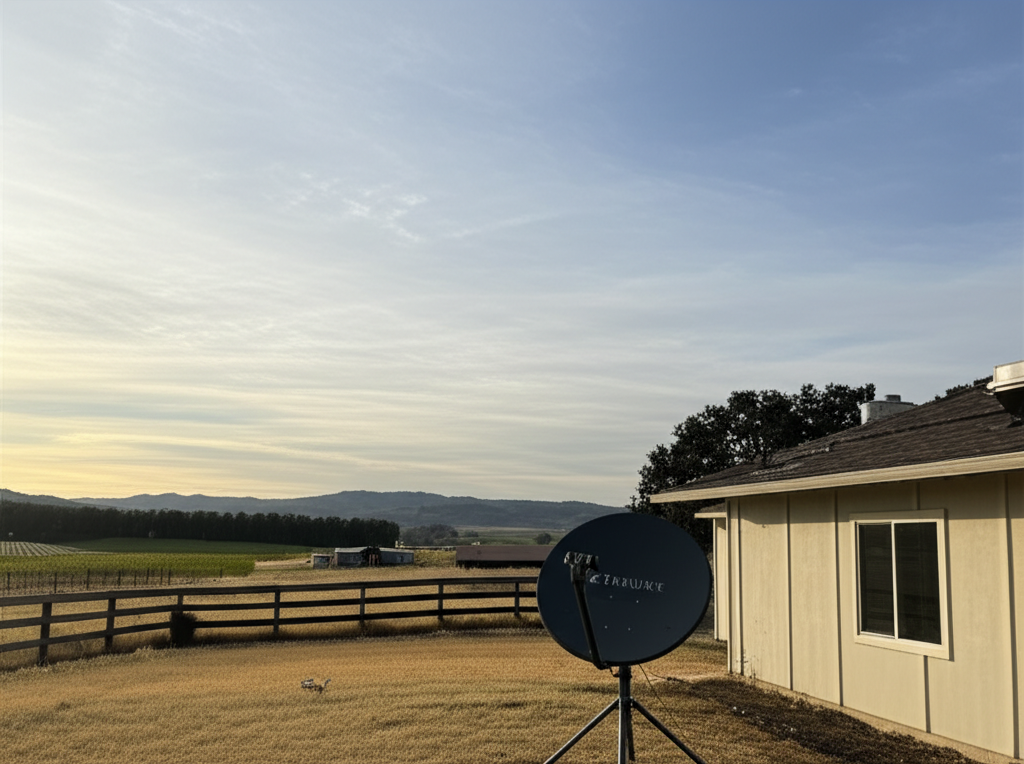
Answer: No. Starlink needs a clear, unobstructed view of the sky, and the roof happens to be the easiest place to get that on most properties. But ground mounts, pole mounts, and wall-mounted setups can work just as well if there's enough open sky. Some people even get great results from a tripod sitting in their backyard. The key factor isn't height for its own sake. It's whether the dish can see enough of the sky without trees, buildings, or terrain getting in the way.
The Situation You're Actually Dealing With
You've got a Starlink kit sitting on your kitchen table, or you're about to pull the trigger on ordering one, and now you're trying to figure out where this thing is supposed to go. And the roof might not feel like a great option for you right now.
Maybe you're renting and your landlord would lose their mind if you drilled into the shingles. Maybe your roof is 30 years old and you're not confident it can handle someone walking around up there with mounting hardware. Maybe it's a steep pitch and you're not exactly excited about the fall risk. Or maybe you've already got solar panels covering every usable square foot.
Whatever the reason, you're wondering if there's another way to make this work, and you want a real answer before you spend a Saturday afternoon experimenting. I get it. The equipment isn't cheap, the monthly bill isn't cheap, and nobody wants to discover after the fact that they picked a bad spot.
The good news is that plenty of people run Starlink from somewhere other than their roof. The less good news is that it depends heavily on your specific property, and there's no universal answer that works for everyone.
Why Placement Matters So Much
Starlink connects to a constellation of satellites in low-Earth orbit, and the dish (SpaceX calls it "Dishy," which is either charming or annoying depending on your tolerance for corporate whimsy) needs to maintain line-of-sight contact with those satellites as they move across the sky. That means it needs a wide, unobstructed view overhead. We're not talking about a small window of sky like an old satellite TV dish that points at one fixed spot. Starlink's dish is constantly scanning a large portion of the sky, tracking satellites as they pass.
When something blocks part of that view, even intermittently, the connection suffers. You'll see it as brief dropouts during video calls, buffering while streaming, or those maddening moments where your internet just disappears for 10 seconds and then comes back like nothing happened. If you work from home and rely on Zoom or Teams, even a few seconds of dropout every couple of minutes can make meetings unbearable.
The roof tends to be the default recommendation because it's usually the highest point on the property. Up there, you're above most nearby obstructions. Trees that would block the dish at ground level might not be a problem from 25 feet up. But "usually the best spot" and "the only spot" are very different things, and the assumption that you need a roof mount stops a lot of people from exploring alternatives that might actually work better for their situation.
What makes this tricky is how much variation there is from one property to the next. Your neighbor across the street might get perfect performance from a tripod in the middle of their lawn because their lot is flat and open. Meanwhile, you've got mature oaks on three sides and a hill to the north, and you can't find a clean signal anywhere below roofline. Every yard is its own puzzle.
What Actually Works (Specific Steps You Can Take)
Step 1: Use the Starlink App's Obstruction Scanner Before You Touch a Single Tool
This is the most important thing you can do, and a surprising number of people skip it. Open the Starlink app on your phone, go to the obstruction check tool, and physically walk your property. At each spot you're considering, hold the phone up at roughly the height the dish would sit and let the app use your camera to map the visible sky.
Do this at your roof peak if you can safely get up there. Then do it at ground level in the yard. Try the top of your fence line. Try the south side of your garage. Try that clear patch behind the shed. The app will show you a sky map with red zones where obstructions would cause problems and give you an estimated percentage of the sky that's blocked. You want as close to zero percent obstruction as possible, but in practice, anything under about 2% tends to be livable for most people.
Do this during the day when you can clearly see what's around you, and be honest about seasonal changes. A spot that looks clear in February might be a different story in June when the leaves fill in.
Step 2: Seriously Consider a Pole Mount or Ground Mount
Starlink sells an official pole adapter, and the third-party market for mounting accessories has gotten pretty mature at this point. A solid metal pole sunk into concrete in your yard, or bolted to the side of your house or garage, can get the dish 10 to 15 feet off the ground without involving your roof at all.
Some specific setups that people use successfully:
- A standalone pole mount in the yard. Dig a hole, pour concrete, set a steel pole (many people use a 2-inch diameter steel pipe from a hardware store), and mount the dish on top. This works especially well if you have a clearing somewhere on your property that's away from the house and trees.
- A wall-mounted pole on the side of a building. Eave mounts and J-mounts designed for old satellite TV dishes can sometimes be repurposed, or you can buy purpose-built Starlink wall mounts. This gets the dish up near the roofline without actually being on the roof.
- A non-penetrating roof mount. If your concern is drilling holes in the roof, weighted non-penetrating mounts sit on flat or low-slope roofs and hold the dish in place with ballast. These are common on commercial buildings and work on some residential flat roofs too.
- A deck or patio mount. If you've got a raised deck with a good sky view, a sturdy railing mount or a weighted tripod on the deck surface can work. Just make sure it's secure enough to handle wind.
Step 3: Think Through the Cable Situation Before You Commit
Wherever you put the dish, a cable has to get from there to your router inside the house. With the newer Starlink hardware, the cable is proprietary and comes attached to the dish, so you can't easily extend it or replace it with a longer run.
Roof mounts often mean running cable down the exterior wall and drilling through somewhere to get inside. A ground-level or low wall mount can be a lot simpler if it's near a window, an existing cable entry point, or a spot where you can run the cable under a door or through a ventilation gap. This might sound like a minor detail, but I've seen people mount the dish in a great spot for signal and then realize they have no clean way to get the cable inside without a 75-foot run along the siding.
Plan the full path from dish to router before you start mounting anything.
Step 4: Be Realistic About Whether Satellite Internet Fits Your Property
This is the part nobody selling you Starlink wants to talk about, but it matters. If your property sits in a valley, or if you're surrounded by tall trees on most sides, or if you're in a dense neighborhood where nearby houses and structures eat into your sky view, you may struggle with Starlink no matter where you put the dish. You can spend money on a tall pole mount and still end up with obstructions that cause regular dropouts.
In situations like that, it's worth looking at fixed wireless internet as an alternative. Fixed wireless works differently from satellite. Instead of communicating with satellites overhead, a small receiver on your property connects to a tower within your local area. The line-of-sight requirement is horizontal rather than a wide overhead view, which means it's often easier to achieve in wooded or hilly areas where Starlink struggles.
Softcom Internet Communications is a fixed wireless provider that serves rural and underserved areas where traditional broadband options are limited. Their service connects through local towers, so the receiver just needs to see the tower, not a huge swath of open sky. For a lot of properties where Starlink placement is a headache, this kind of setup is simpler and more reliable.
Frequently Asked Questions
Can Starlink work indoors or near a window?
Not really. The dish is designed for outdoor use, and glass, walls, and screens all interfere with the signal significantly. Some people have reported marginal results placing the dish right next to a large window, but performance is consistently poor compared to an outdoor installation. SpaceX explicitly recommends outdoor placement, and in my experience, trying to use it indoors leads to frustration.
How high does the Starlink dish need to be?
There's no specific height requirement. What matters is the sky view from wherever the dish sits. If you have a flat, open property with no tall trees or buildings nearby, the dish could work perfectly sitting on a tripod at ground level. If you're surrounded by obstructions, you'll need to get it higher to clear them. The Starlink app's obstruction tool is the best way to figure out what height you actually need at any given spot on your property.
Will weather affect the dish no matter where I mount it?
Yes, to some degree. Heavy rain, thick cloud cover, and especially snow accumulation on the dish can degrade performance temporarily. The dish has a built-in heating element to melt snow, which works reasonably well but uses extra power. Mounting location doesn't change weather susceptibility much, though a sheltered spot might accumulate less snow. In general, weather-related interruptions are brief and the connection recovers on its own.
What if I've tried multiple spots and still can't get a clean signal?
If you've tested several locations with the Starlink app and every spot shows significant obstructions, your property may just not be a great fit for satellite internet. This is more common than people expect, especially in heavily forested areas or properties with challenging terrain. Before giving up on reliable internet entirely, check whether a fixed wireless provider like Softcom Internet Communications serves your area. The technology works differently enough that properties unsuitable for Starlink can sometimes get solid fixed wireless coverage without any of the placement headaches.
Does Starlink void my roof warranty?
This depends on your roofing material, your warranty terms, and how the installation is done. Any time you drill through a roof, there's a risk of voiding the manufacturer's warranty or creating potential leak points. If this is a concern, a non-roof mounting option like a pole mount, wall mount, or ground mount avoids the issue entirely. If you do go with a roof mount, consider having a professional handle it so the penetrations are properly sealed and documented.
Can I move the dish around to test spots before permanently mounting it?
Absolutely, and you should. The standard Starlink dish works fine just sitting on the ground or on the included kickstand. Set it up in a temporary spot, use it for a day or two, and pay attention to how often you experience dropouts. Then try another spot. This trial-and-error approach takes more time than just picking a spot and mounting it permanently, but it's the most reliable way to find the best location on your property. Just keep in mind that results might change seasonally as trees gain or lose leaves.